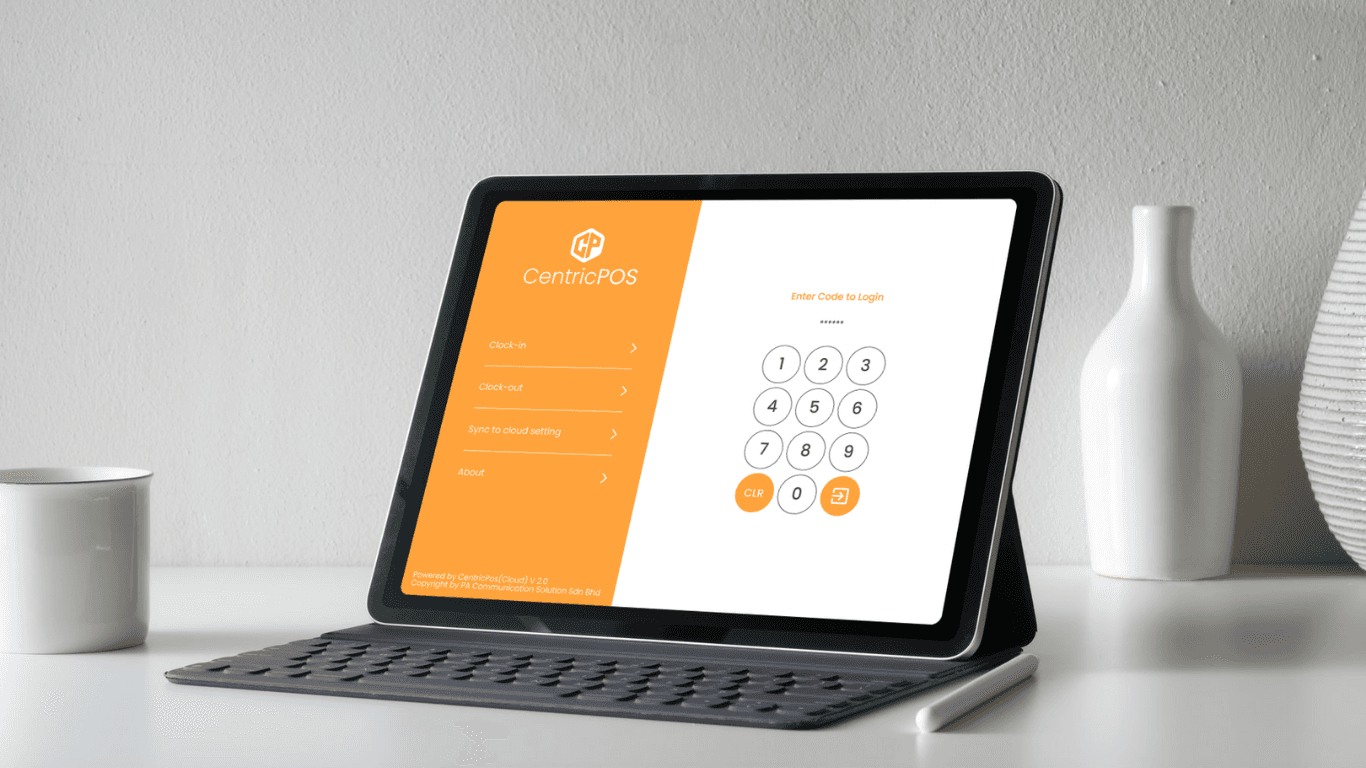
Revamping the Digital Experience and Visualisation for CentricPos
Revamping the Digital Experience and Visualisation for CentricPos
Industry
Food & Beverages
Industry
Food & Beverages
Industry
Food & Beverages
Durations
11 Weeks
Durations
11 Weeks
Durations
11 Weeks
Role
UI/UX Designer & Consultant
Role
UI/UX Designer & Consultant
Role
UI/UX Designer & Consultant
Background
PA Communication Solution Sdn Bhd was founded in year 2012. The core business is to provide Point-of-Sales Solution for F&B Industry and Retail Industry. PA Communication Solution Sdn Bhd is growing rapidly in the past few years with all the supports from various parties, such as our clients, our suppliers, our business partners and our staff. We do believe that PA Communication is not just providing solutions for clients, but as well providing reliable services.
Our R&D will be kept going and believe us, more and more solutions will be available to our clients from time to time. And our company is a leading company on providing cheapest and most trustable payment gateway platform.
Background
PA Communication Solution Sdn Bhd was founded in year 2012. The core business is to provide Point-of-Sales Solution for F&B Industry and Retail Industry. PA Communication Solution Sdn Bhd is growing rapidly in the past few years with all the supports from various parties, such as our clients, our suppliers, our business partners and our staff. We do believe that PA Communication is not just providing solutions for clients, but as well providing reliable services.
Our R&D will be kept going and believe us, more and more solutions will be available to our clients from time to time. And our company is a leading company on providing cheapest and most trustable payment gateway platform.
Background
PA Communication Solution Sdn Bhd was founded in year 2012. The core business is to provide Point-of-Sales Solution for F&B Industry and Retail Industry. PA Communication Solution Sdn Bhd is growing rapidly in the past few years with all the supports from various parties, such as our clients, our suppliers, our business partners and our staff. We do believe that PA Communication is not just providing solutions for clients, but as well providing reliable services.
Our R&D will be kept going and believe us, more and more solutions will be available to our clients from time to time. And our company is a leading company on providing cheapest and most trustable payment gateway platform.
Core problem
The current system suffers from an outdated UI and a poor user experience, resulting in:
Unattractive and non-intuitive visual design that lacks modern appeal
Complicated, disorganised navigation, making the system difficult to use
A steep learning curve, especially for new users, leading to low adoption
Inefficient and confusing workflows that frustrate users and hinder productivity
Lack of responsive design, with no support for mobile or tablet devices
Core problem
The current system suffers from an outdated UI and a poor user experience, resulting in:
Unattractive and non-intuitive visual design that lacks modern appeal
Complicated, disorganised navigation, making the system difficult to use
A steep learning curve, especially for new users, leading to low adoption
Inefficient and confusing workflows that frustrate users and hinder productivity
Lack of responsive design, with no support for mobile or tablet devices
Core problem
The current system suffers from an outdated UI and a poor user experience, resulting in:
Unattractive and non-intuitive visual design that lacks modern appeal
Complicated, disorganised navigation, making the system difficult to use
A steep learning curve, especially for new users, leading to low adoption
Inefficient and confusing workflows that frustrate users and hinder productivity
Lack of responsive design, with no support for mobile or tablet devices
Approach for CentricPos
To address usability issues and modernise the interface, we adopted a user-centred design approach, focusing on intuitive navigation, aesthetic improvements, and streamlined workflows. Our goal was to reduce the learning curve, improve user satisfaction, and support cross-device accessibility.
Approach for CentricPos
To address usability issues and modernise the interface, we adopted a user-centred design approach, focusing on intuitive navigation, aesthetic improvements, and streamlined workflows. Our goal was to reduce the learning curve, improve user satisfaction, and support cross-device accessibility.
Approach for CentricPos
To address usability issues and modernise the interface, we adopted a user-centred design approach, focusing on intuitive navigation, aesthetic improvements, and streamlined workflows. Our goal was to reduce the learning curve, improve user satisfaction, and support cross-device accessibility.
Design Process
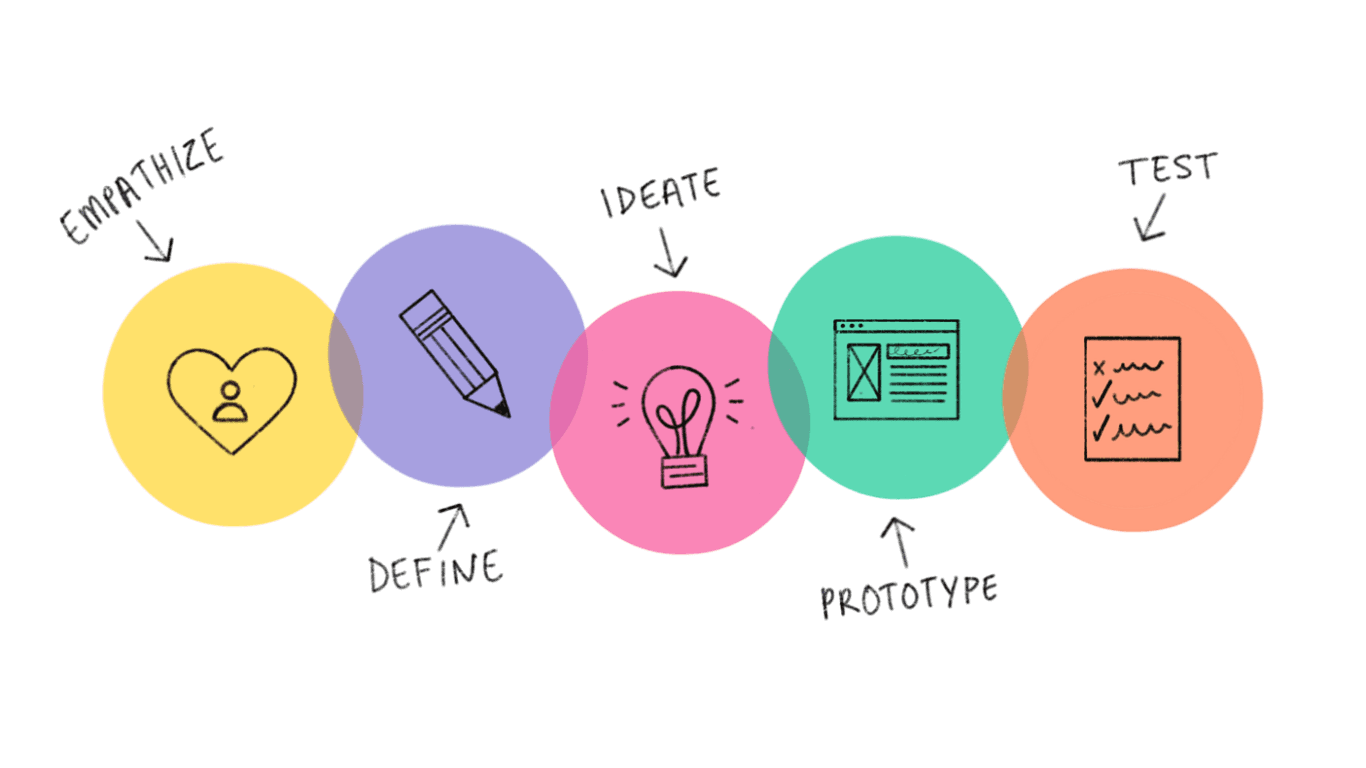
To begin the process, I applied the Design Thinking approach to gain deeper insights into user pain points and gather comprehensive data to inform the design decisions.
Design Process
To begin the process, I applied the Design Thinking approach to gain deeper insights into user pain points and gather comprehensive data to inform the design decisions.
Design Process
To begin the process, I applied the Design Thinking approach to gain deeper insights into user pain points and gather comprehensive data to inform the design decisions.
Steps Taken
User Research & Pain Point Analysis
Conducted user interviews and gathered feedback
Identified key frustrations and usage patterns
UI Redesign
Applied a modern visual design system aligned with current trends
Introduced a clean, consistent layout and intuitive iconography
Navigation Overhaul
Reorganised information architecture for easier access
Implemented a simplified menu and clear pathways for key tasks
UX Optimisation
Streamlined task flows to reduce clicks and confusion
Designed onboarding tips and contextual help for new users
Responsive Design Implementation
Ensured full compatibility across desktop and tablet
Usability Testing
Ran usability tests to validate design decisions
Iterated based on real user feedback
Steps Taken
User Research & Pain Point Analysis
Conducted user interviews and gathered feedback
Identified key frustrations and usage patterns
UI Redesign
Applied a modern visual design system aligned with current trends
Introduced a clean, consistent layout and intuitive iconography
Navigation Overhaul
Reorganised information architecture for easier access
Implemented a simplified menu and clear pathways for key tasks
UX Optimisation
Streamlined task flows to reduce clicks and confusion
Designed onboarding tips and contextual help for new users
Responsive Design Implementation
Ensured full compatibility across desktop and tablet
Usability Testing
Ran usability tests to validate design decisions
Iterated based on real user feedback
Steps Taken
User Research & Pain Point Analysis
Conducted user interviews and gathered feedback
Identified key frustrations and usage patterns
UI Redesign
Applied a modern visual design system aligned with current trends
Introduced a clean, consistent layout and intuitive iconography
Navigation Overhaul
Reorganised information architecture for easier access
Implemented a simplified menu and clear pathways for key tasks
UX Optimisation
Streamlined task flows to reduce clicks and confusion
Designed onboarding tips and contextual help for new users
Responsive Design Implementation
Ensured full compatibility across desktop and tablet
Usability Testing
Ran usability tests to validate design decisions
Iterated based on real user feedback
Wireframes
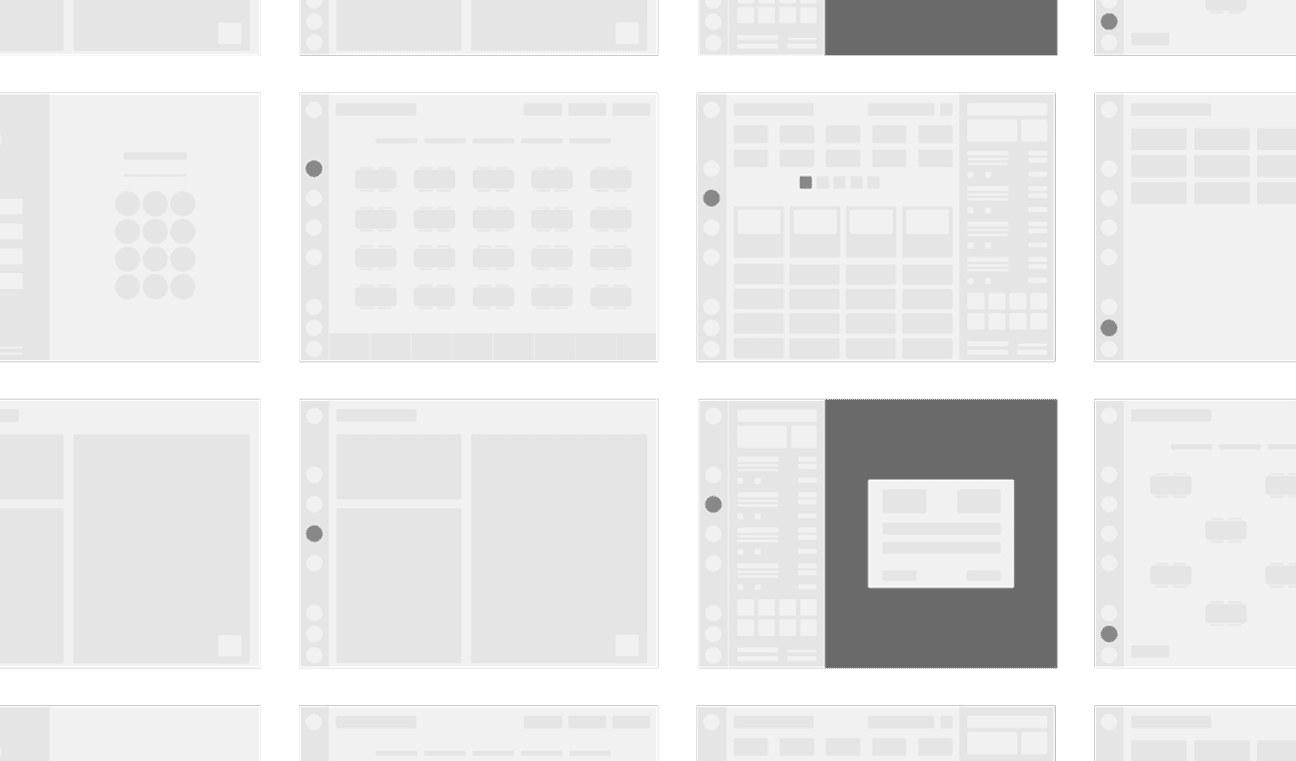
These are the low-fidelity wireframe concepts approved by the client, developed by addressing key user pain points and analysing the limitations of the current system. The design process focused on improving usability, simplifying navigation, and ensuring a more intuitive user flow.
Key findings from user research revealed the following pain points:
A steep learning curve, especially for new users
Unfriendly and cluttered navigation, making the system hard to use
Lack of support for mobile and tablet devices
Confusing workflows that disrupted task completion
These insights guided the wireframe development, ensuring the proposed solution directly tackled these issues while laying a strong foundation for high-fidelity design and further validation.
Wireframes
These are the low-fidelity wireframe concepts approved by the client, developed by addressing key user pain points and analysing the limitations of the current system. The design process focused on improving usability, simplifying navigation, and ensuring a more intuitive user flow.
Key findings from user research revealed the following pain points:
A steep learning curve, especially for new users
Unfriendly and cluttered navigation, making the system hard to use
Lack of support for mobile and tablet devices
Confusing workflows that disrupted task completion
These insights guided the wireframe development, ensuring the proposed solution directly tackled these issues while laying a strong foundation for high-fidelity design and further validation.
Wireframes
These are the low-fidelity wireframe concepts approved by the client, developed by addressing key user pain points and analysing the limitations of the current system. The design process focused on improving usability, simplifying navigation, and ensuring a more intuitive user flow.
Key findings from user research revealed the following pain points:
A steep learning curve, especially for new users
Unfriendly and cluttered navigation, making the system hard to use
Lack of support for mobile and tablet devices
Confusing workflows that disrupted task completion
These insights guided the wireframe development, ensuring the proposed solution directly tackled these issues while laying a strong foundation for high-fidelity design and further validation.
Hi-Fi Design Concept
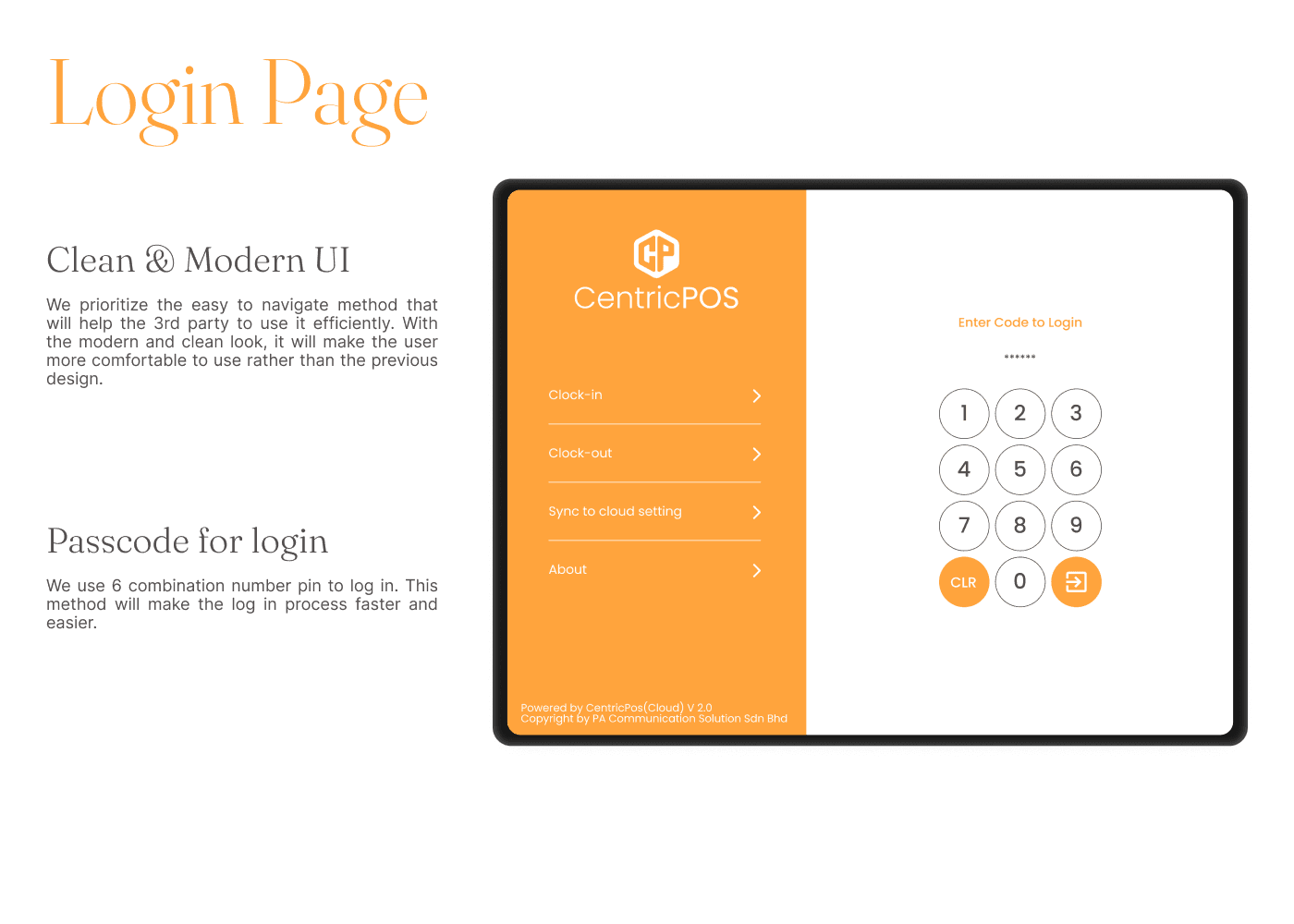
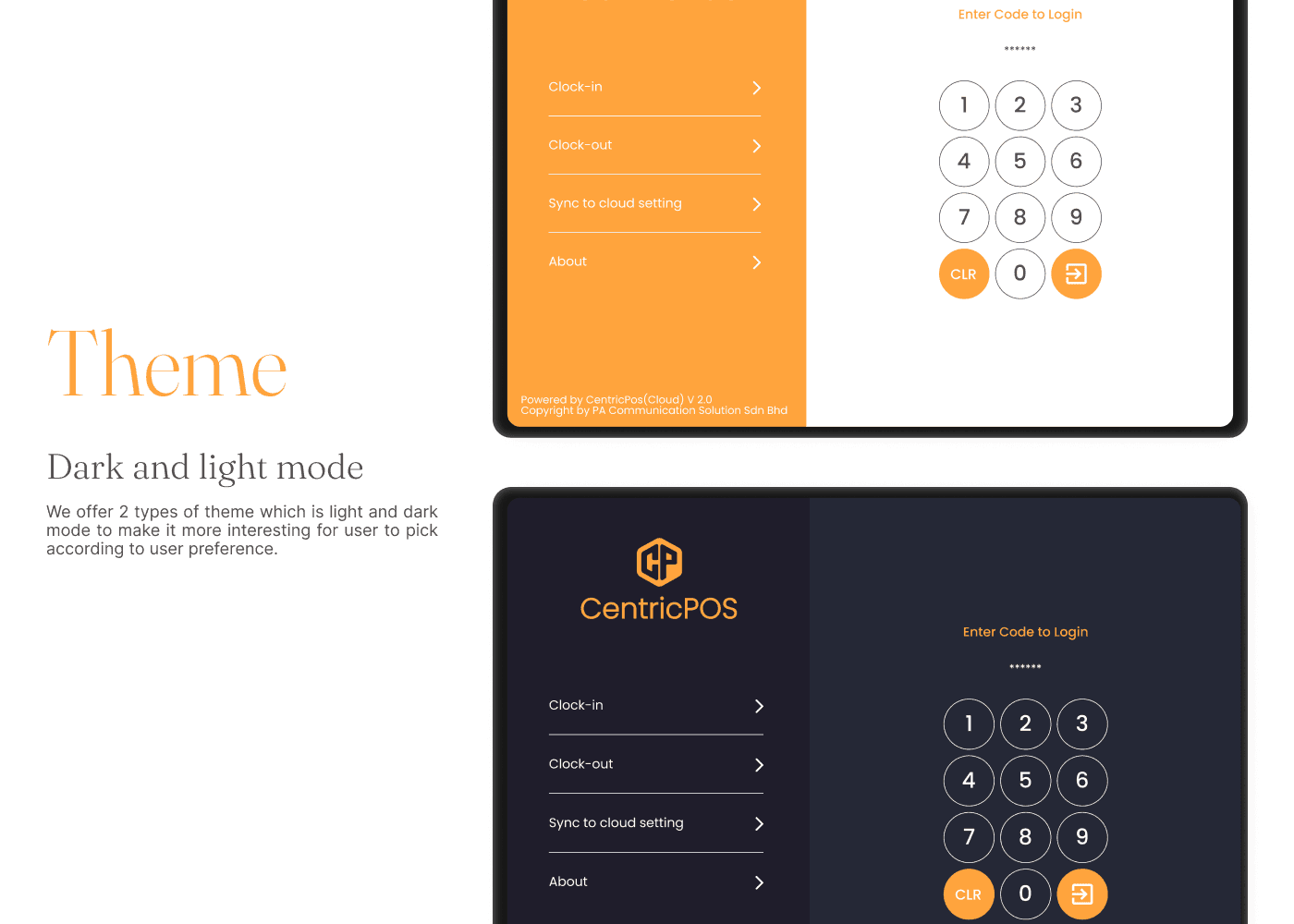
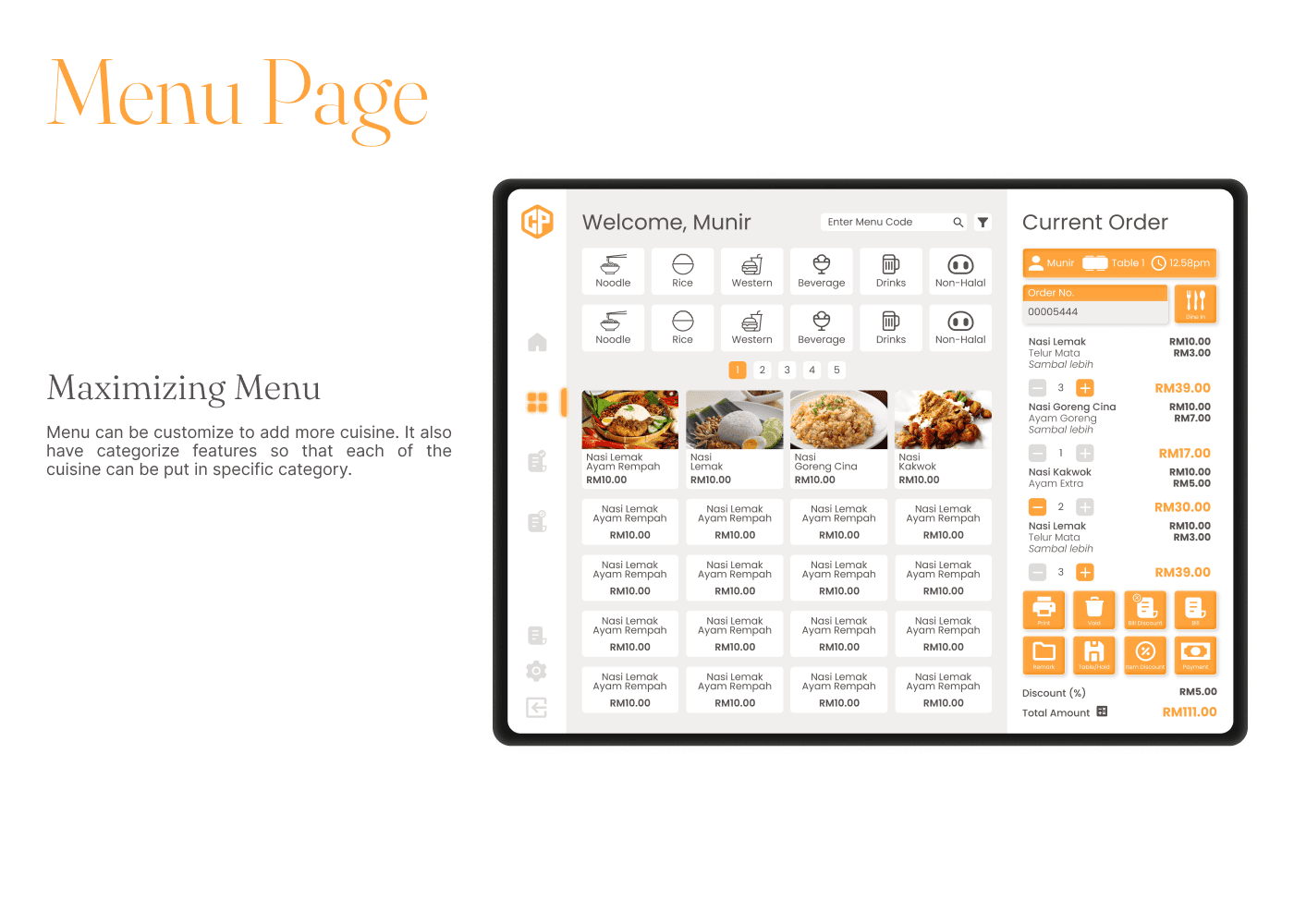
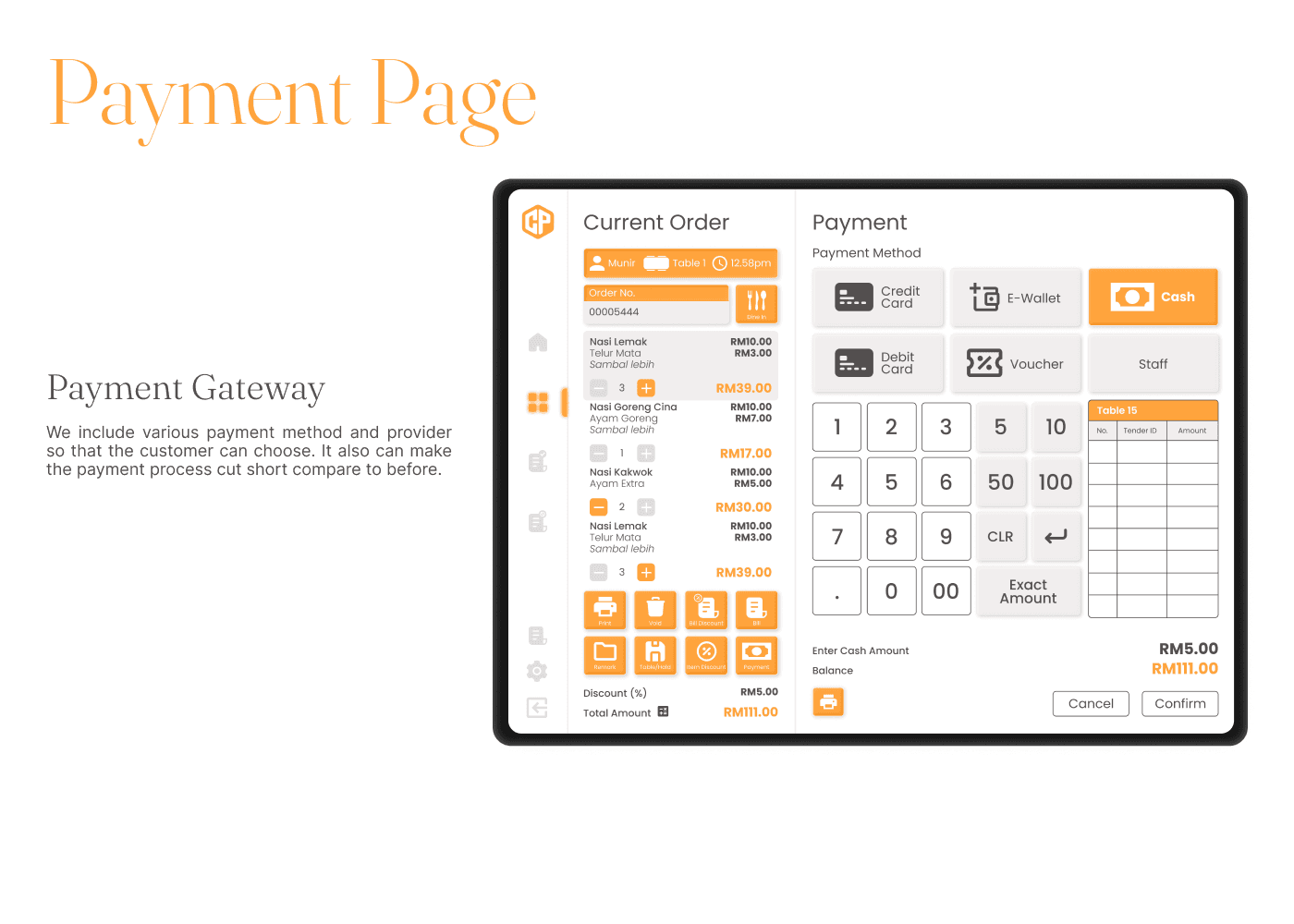
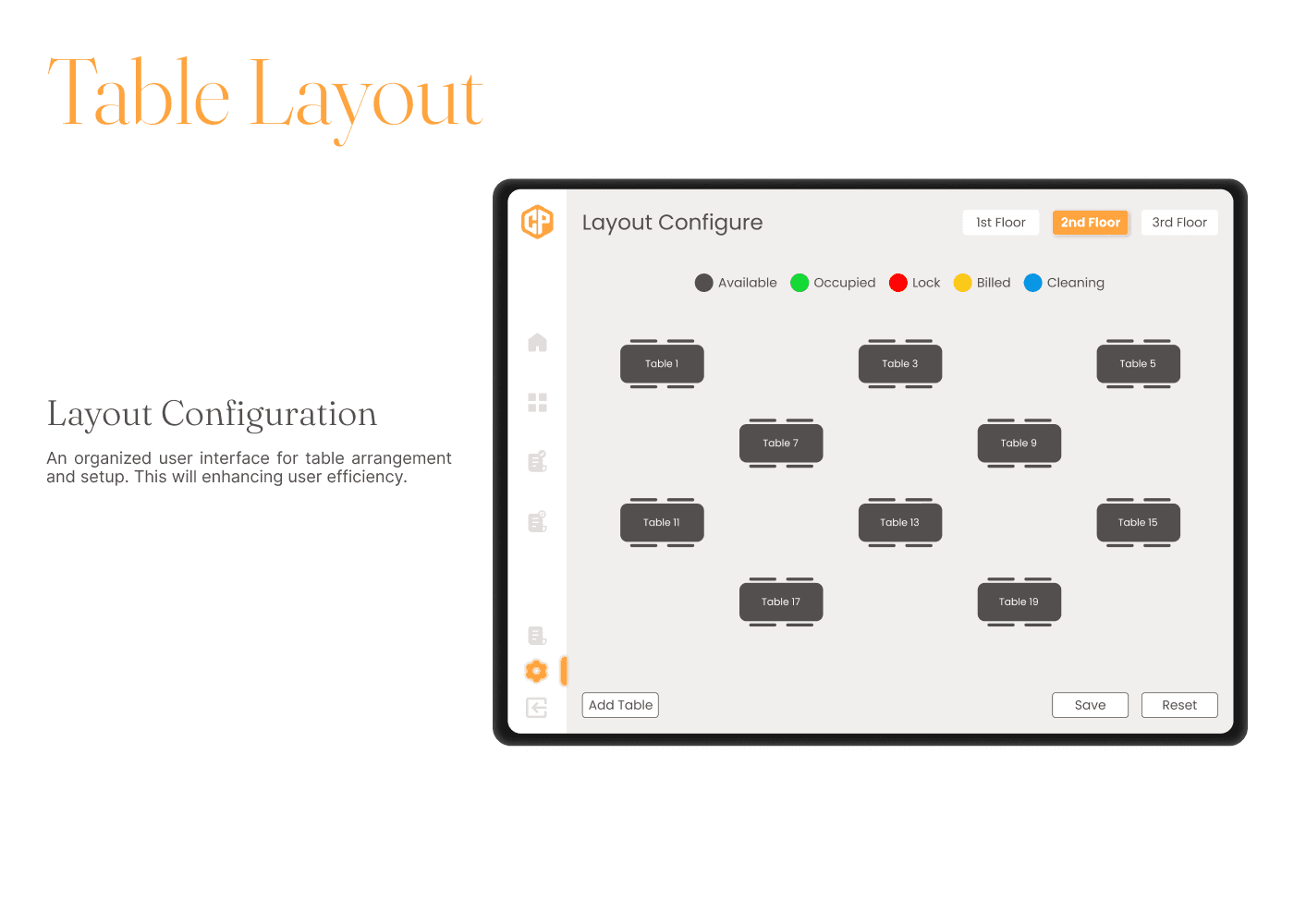
These pages highlight the major improvements implemented based on earlier user feedback and the approved wireframes. They incorporate key enhancements in usability, navigation, and visual consistency—directly addressing the pain points identified during research.
Each page was carefully refined to ensure a more intuitive user experience, optimized layout structure, and better content hierarchy. The finalized designs are now ready for handoff to the development team for implementation.
Hi-Fi Design Concept
These pages highlight the major improvements implemented based on earlier user feedback and the approved wireframes. They incorporate key enhancements in usability, navigation, and visual consistency—directly addressing the pain points identified during research.
Each page was carefully refined to ensure a more intuitive user experience, optimized layout structure, and better content hierarchy. The finalized designs are now ready for handoff to the development team for implementation.
Hi-Fi Design Concept
These pages highlight the major improvements implemented based on earlier user feedback and the approved wireframes. They incorporate key enhancements in usability, navigation, and visual consistency—directly addressing the pain points identified during research.
Each page was carefully refined to ensure a more intuitive user experience, optimized layout structure, and better content hierarchy. The finalized designs are now ready for handoff to the development team for implementation.
Results and Impact
The CentricPos redesign delivered measurable improvements across both user experience and system performance. Through focused UI/UX enhancements, the platform became more intuitive, visually appealing, and efficient, resulting in clear benefits for users and business outcomes.
Results and Impact
The CentricPos redesign delivered measurable improvements across both user experience and system performance. Through focused UI/UX enhancements, the platform became more intuitive, visually appealing, and efficient, resulting in clear benefits for users and business outcomes.
Results and Impact
The CentricPos redesign delivered measurable improvements across both user experience and system performance. Through focused UI/UX enhancements, the platform became more intuitive, visually appealing, and efficient, resulting in clear benefits for users and business outcomes.
Key Improvements
Modernised UI with clean visuals and consistent components
Improved navigation with simplified menus and logical structure
Cross-device compatibility for mobile, tablet, and desktop
Reduced learning curve through intuitive design and onboarding support
Streamlined workflows that save time and reduce user frustration
Positive user feedback indicating increased satisfaction and usability
Key Improvements
Modernised UI with clean visuals and consistent components
Improved navigation with simplified menus and logical structure
Cross-device compatibility for mobile, tablet, and desktop
Reduced learning curve through intuitive design and onboarding support
Streamlined workflows that save time and reduce user frustration
Positive user feedback indicating increased satisfaction and usability
Key Improvements
Modernised UI with clean visuals and consistent components
Improved navigation with simplified menus and logical structure
Cross-device compatibility for mobile, tablet, and desktop
Reduced learning curve through intuitive design and onboarding support
Streamlined workflows that save time and reduce user frustration
Positive user feedback indicating increased satisfaction and usability
Key Outcomes
30% increase in user satisfaction
Improved navigation and modern visual design contributed to a more enjoyable and intuitive user experience.30% boost in workflow efficiency
Streamlined processes and clearer task flows enabled users to complete actions faster and with greater confidence.20% improvement in content and interface clarity
Better structure and layout made the system easier to understand, especially for first-time users.15% increase in feedback clarity
User feedback became more constructive and specific, highlighting clearer communication between users and the design team.95% increase in successful transactions
The improved usability led to a dramatic rise in successful task completions and overall platform reliability.
Key Outcomes
30% increase in user satisfaction
Improved navigation and modern visual design contributed to a more enjoyable and intuitive user experience.30% boost in workflow efficiency
Streamlined processes and clearer task flows enabled users to complete actions faster and with greater confidence.20% improvement in content and interface clarity
Better structure and layout made the system easier to understand, especially for first-time users.15% increase in feedback clarity
User feedback became more constructive and specific, highlighting clearer communication between users and the design team.95% increase in successful transactions
The improved usability led to a dramatic rise in successful task completions and overall platform reliability.
Key Outcomes
30% increase in user satisfaction
Improved navigation and modern visual design contributed to a more enjoyable and intuitive user experience.30% boost in workflow efficiency
Streamlined processes and clearer task flows enabled users to complete actions faster and with greater confidence.20% improvement in content and interface clarity
Better structure and layout made the system easier to understand, especially for first-time users.15% increase in feedback clarity
User feedback became more constructive and specific, highlighting clearer communication between users and the design team.95% increase in successful transactions
The improved usability led to a dramatic rise in successful task completions and overall platform reliability.